📊 DQ Checks
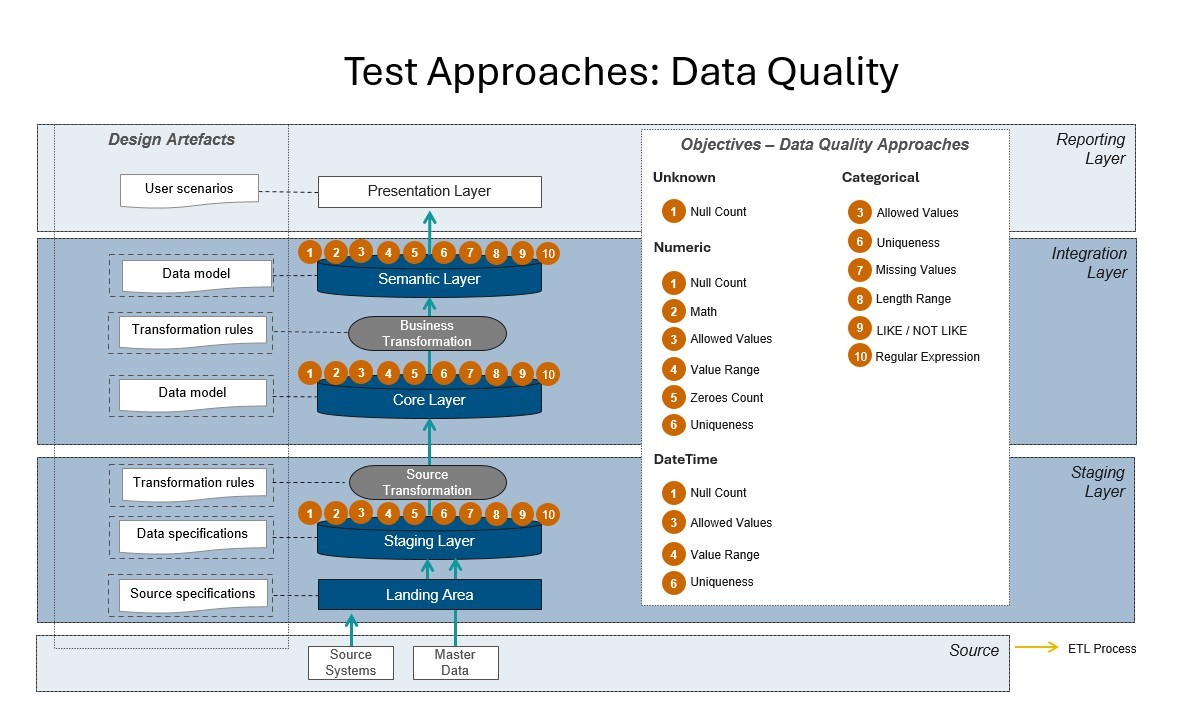
Data Quality checks confirm that your data meets the expected business and technical rules at every layer of the warehouse. Commonly referred as Data Validation, Data Integrity, or Data Consistency, Data Quality checks are a critical part of data management and ensure that your data is accurate, reliable, and consistent. These checks cover a wide spectrum of validation needs, including:
- Null and missing values
- Mathematical conditions
- Allowed values
- Numeric and text ranges
- Uniqueness constraints
- Text patterns (LIKE / NOT LIKE, regular expressions)
- Date validations
- Suspicious zero values
- Text length checks
- Pre- and post-transformation validations
Why?
- Prevents reporting errors, analytical inconsistencies, and loss of trust in data.
- Detects anomalies and issues early at every stage of processing.
Where?
- Applicable at every layer — from landing, through core, to semantic and reporting.
Data Quality Checks
Below are the most commonly used Data Quality checks in X-AutoMate, grouped by category.
🔍 Emptiness
1. Null Count
Counts the number of records with a NULL value in a given column.
Description:
Identifies missing, incomplete, or improperly loaded data. Especially important for mandatory fields like customer names, transaction amounts, or key business dates.
Why important?
Missing values can cause wrong conclusions, break business processes, or distort KPIs.
Example:
SELECT COUNT(*)
FROM customer
WHERE first_name IS NULL;
🔢 Numeric
1.Null Count
Counts missing numeric values (NULL values in integer, decimal, or floating-point columns).
Example:
SELECT COUNT(*)
FROM orders
WHERE order_amount IS NULL;
2. Math
Validates numeric values using operators (<, >, =, etc.) to enforce logical or business rules.
Example:
SELECT *
FROM employee
WHERE age < 18;
3. Allowed Values
Ensures numeric values are only from a predefined set.
Example:
SELECT *
FROM orders
WHERE status NOT IN (1, 2, 3);
4. Value Range
Checks if numeric values are within a defined range.
Example:
SELECT *
FROM products
WHERE price NOT BETWEEN 1 AND 9999;
5. Zeroes Count
Counts values equal to zero.
Example:
SELECT COUNT(*)
FROM invoice
WHERE amount = 0;
6. Uniqueness
Detects duplicate values in a numeric column.
Example:
SELECT customer_id, COUNT(*)
FROM orders
GROUP BY customer_id
HAVING COUNT(*) > 1;
🕒 DateTime
3. Allowed Values
Checks if timestamps are from a valid predefined set.
Example:
SELECT *
FROM events
WHERE event_time NOT IN ('2024-01-01', '2024-12-31');
4. Value Range
Validates timestamps are within a logical range.
Example:
SELECT *
FROM orders
WHERE order_date NOT BETWEEN '2024-01-01' AND CURRENT_DATE;
1. Null Count
Detects missing timestamps.
Example:
SELECT COUNT(*)
FROM visits
WHERE visit_time IS NULL;
6. Uniqueness
Finds duplicate timestamps.
Example:
SELECT event_time, COUNT(*)
FROM logs
GROUP BY event_time
HAVING COUNT(*) > 1;
🏷️ Categorical
3. Allowed Values
Ensures string values match a valid list.
Example:
SELECT *
FROM customer
WHERE country NOT IN ('PL', 'NO', 'SE');
6. Uniqueness
Finds duplicate strings in a column.
Example:
SELECT email, COUNT(*)
FROM users
GROUP BY email
HAVING COUNT(*) > 1;
7. Missing Values
Detects empty or NULL string values.
Example:
SELECT *
FROM customer
WHERE TRIM(first_name) = '' OR first_name IS NULL;
8. Length Range
Checks if string length is within limits.
Example:
SELECT *
FROM customer
WHERE LENGTH(last_name) NOT BETWEEN 2 AND 30;
9. LIKE / NOT LIKE
Validates values match expected patterns.
Example:
SELECT *
FROM products
WHERE name NOT LIKE 'PROD%';
10. Regular Expression
Validates values with regex.
Example:
SELECT *
FROM users
WHERE email NOT REGEXP '^[a-z0-9._%+-]+@[a-z0-9.-]+\.[a-z]{2,}$';
✅ Using these DQ checks ensures high data quality across all stages — from loading to reporting.