🏗 Core Layer
The Core Layer is the main integration and transformation layer — where data from multiple sources is deduplicated, enriched, and prepared for reporting and analytics.
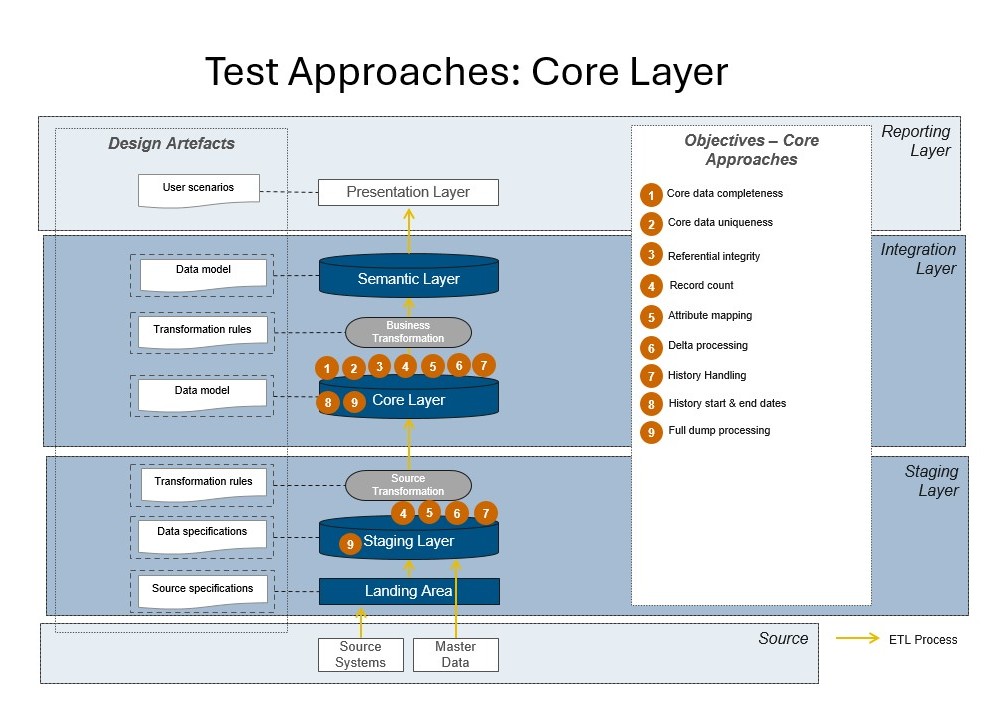
Why?
- This is where the main business logic, mappings, and data transformations happen — errors here impact the entire warehouse and all downstream reporting.
- Ensures that only high-quality, well-integrated, and business-ready data moves on to semantic or reporting layers.
Where?
- The Core Layer is positioned after Staging and before Semantic/Reporting layers.
Methods
1. Data Completeness — value_empty / value_missing_null
Purpose: Ensures all expected and required records are present after integration, mapping, and transformation. Why it matters: Missing records can signal data loss during DB, incorrect joins, or filter logic errors. Missing data here means incomplete analytics and potentially wrong business decisions. Example:
SELECT *
FROM core_orders
WHERE important_flag IS NULL;
2. Data Uniqueness — value_unique
Purpose: Confirms that fields meant to be unique identifiers (e.g., customer_id, transaction_number) are truly unique after transformation and integration.
Why it matters: Duplicates can distort KPIs, cause double-counting, or break referential integrity, often appearing after merging multiple sources.
Example:
SELECT customer_id, COUNT(*)
FROM core_customers
GROUP BY customer_id
HAVING COUNT(*) > 1;
3. Referential Integrity — refferential_integrity
Purpose: Ensures all foreign keys reference existing primary keys. Why it matters: Broken referential integrity causes failed joins, orphaned records, and incorrect analytics. Example:
SELECT order_id
FROM core_orders
WHERE customer_id NOT IN (
    SELECT customer_id FROM core_customers
);
4. Record Count — reconciliation_count
Purpose: Compares the number of records between layers (e.g., Staging → Core). Why it matters: Large differences may signal join/filter issues or DB bugs. Counts should remain consistent unless business rules explain changes. Example:
SELECT COUNT(*) FROM staging_orders;
SELECT COUNT(*) FROM core_orders;
5. Attribute Mapping — attribute_mapping
Purpose: Ensures attributes (e.g., statuses, categories) are mapped according to business rules and reference tables. Why it matters: Incorrect mappings cause misclassification, broken business logic, and reporting errors. Example:
SELECT *
FROM core_orders
WHERE order_status NOT IN (
    SELECT status FROM ref_statuses
);
6. Delta Processing — processing_delta
Purpose: Validates that only new or changed data is processed in incremental DB loads. Why it matters: Incorrect delta logic leads to missing updates or duplicate records. Example:
SELECT *
FROM core_delta_load
WHERE load_timestamp > (
    SELECT MAX(load_timestamp) FROM previous_loads
);
7. History Handling — processing_history
Purpose: Checks that historical changes (e.g., Slowly Changing Dimensions) are tracked correctly with valid date ranges. Why it matters: Poor history handling causes inaccurate historical analytics and audit issues. Example:
SELECT *
FROM core_customer_history
WHERE valid_to < valid_from;
8. History Start and End Dates — processing_history
Purpose: Ensures all versioned records have valid and non-null date ranges. Why it matters: Incorrect date ranges prevent accurate reconstruction of historical states. Example:
SELECT *
FROM core_customer_history
WHERE valid_from IS NULL OR valid_to IS NULL;
9. Full Dump Processing — processing_full_dump
Purpose: Validates that full load jobs correctly reload all data into the Core Layer. Why it matters: Faulty full loads can miss records or introduce duplicates, making Core inconsistent with upstream layers. Example:
SELECT COUNT(*) FROM full_load_table;