📜 Semantic Layer
The Semantic Layer 🗂️ is the reporting and presentation layer where data is aggregated 📊 and transformed 🛠️ for analytics and reporting.
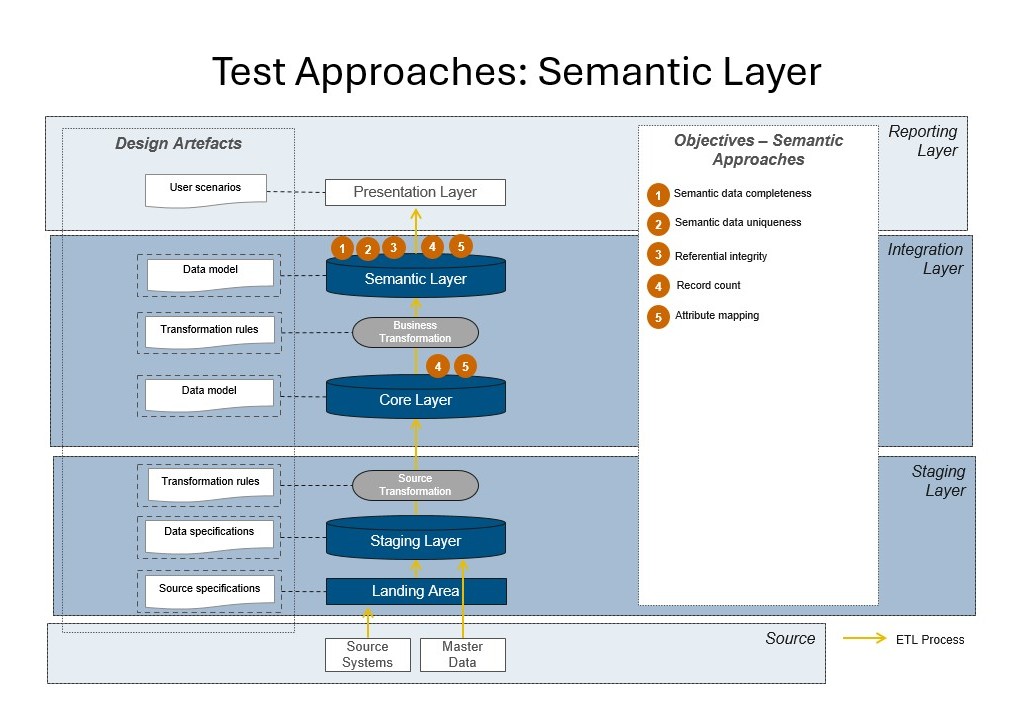
💡 Why?
- ✅ Ensures reported values, KPIs, aggregates, and hierarchies match business definitions, not just raw technical data.
- 🛡️ Acts as the last line of defense before data reaches dashboards 📈 and business users, catching issues that earlier layers might miss.
📍 Where?
- 📊 Semantic Layer – just before data is consumed by BI tools, dashboards, or end users.
🛠 Methods
1. 📥 Data Completeness — value_empty / value_missing_null
Purpose: Checks for missing data in reports or views. Description: Ensures that key measures, facts, and dimensions in reporting outputs are always populated. Missing values at this stage may indicate earlier transformation issues or new problems introduced by aggregation or business rules. Why is this important? Missing values in final outputs can cause reporting gaps, confuse end users, and undermine trust in analytics.
Example:
SELECT *
FROM semantic_sales
WHERE sales_amount IS NULL;
2. 🔍 Data Uniqueness — value_unique
Purpose: Ensures key values are unique in outputs. Description: Confirms that business identifiers, report IDs, or other key fields are unique in the semantic layer. Duplicate keys here can cause duplicate rows in dashboards, double-counting, and inaccurate reporting. Why is this important? Duplicate values break reporting logic and analytics, especially in drilldowns or data exports.
Example:
SELECT report_id, COUNT(*)
FROM semantic_reports
GROUP BY report_id
HAVING COUNT(*) > 1;
3. 🔗 Referential Integrity — refferential_integrity
Purpose: Checks foreign key/reference matches in views and reports. Description: Validates that all references in the semantic layer (such as product IDs, customer IDs) point to existing, valid dimension values. This prevents orphaned data from appearing in reports. Why is this important? Broken references result in facts with no context, making them invisible in dashboards or causing errors for business users.
Example:
SELECT product_id
FROM semantic_sales
WHERE product_id NOT IN (
    SELECT id FROM dim_product
);
4. 📊 Record Count — reconciliation_count
Purpose: Validates that record counts in reports are as expected. Description: Checks that the total number of records in semantic outputs (e.g., reports, dashboards, or exports) matches expectations based on business rules or previous layers. Why is this important? Unexpected changes in row count can indicate data loss, filter bugs, or transformation errors missed in prior steps.
Example:
SELECT COUNT(*)
FROM semantic_customers;
5. 🏷️ Attribute Mapping — attribute_mapping
Purpose: Ensures attributes in reports match those in core (e.g., status mappings). Description: Verifies that mapped attributes (statuses, categories, regions, etc.) are consistent with reference tables and business logic. For example, report statuses should match those defined in core or reference tables, with no unexpected values. Why is this important? Incorrect attribute mapping leads to inconsistent metrics, misclassified records, or incorrect aggregations in final reports.
Example:
SELECT status
FROM semantic_sales
WHERE status NOT IN (
    SELECT status FROM ref_status
);