📚 Reference Tables
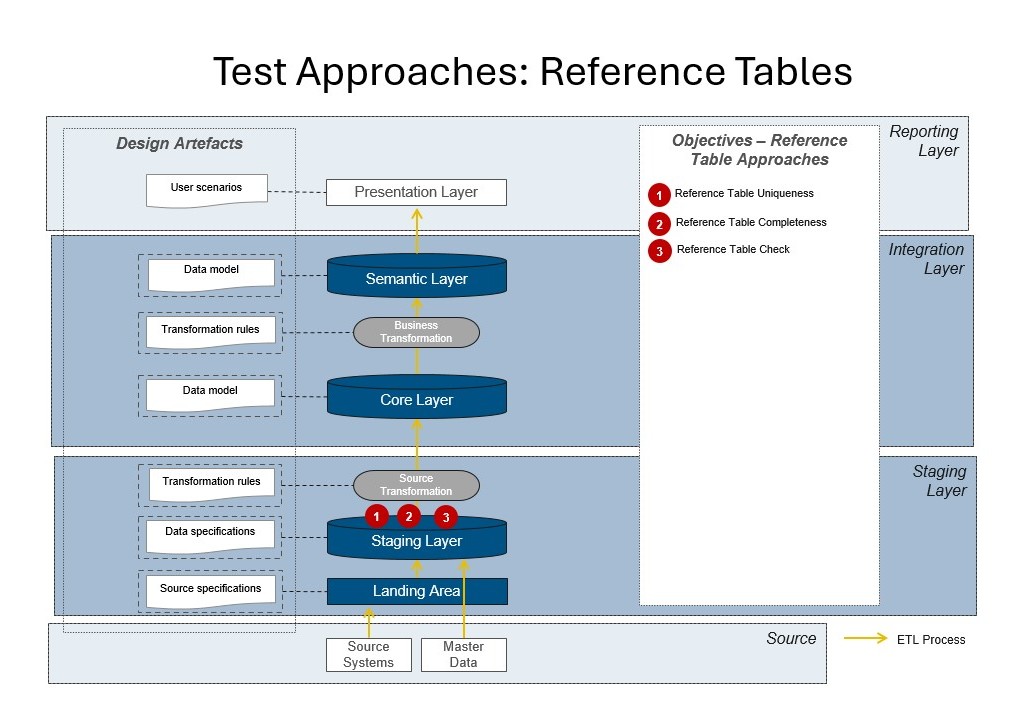
Reference Tables map various identifiers and data types (like 🌍 region, 🏷️ brand, 📊 status, 🏪 dealer) and are essential for correct data integration, attribute mapping, and meaningful reporting throughout your data platform.
💡 Why?
- ✅ Enable correct mapping, filtering, and grouping in reporting by providing controlled vocabularies and dictionaries.
- 🛡️ Ensure label, dictionary, and hierarchy consistency across all layers and systems, making it possible to translate codes or IDs into business-friendly names and groups.
- 🏗️ Serve as a backbone for attribute mapping, transformations, and business logic, ensuring every fact or transaction can be described with relevant, up-to-date reference data.
📍 Where?
- Most often in the 🗄️ Staging Layer (when raw codes are translated), but also in 🛠️ Core for further mappings, enrichment, or business logic application.
🛠️ Methods
1. 🔑 Table Uniqueness
Checks for duplicate key values (e.g., duplicate region codes).
📜 Description: This check verifies that each identifier in a reference table (such as a region code, status code, or brand ID) is unique. Duplicate keys in reference tables can cause incorrect joins, misreporting, or failed data integrations.
⚠️ Why is this important? If reference values are not unique, facts and dimensions that join to them may link incorrectly, leading to wrong groupings, incorrect aggregations, and possible loss of data integrity throughout all layers.
💻 Example:
SELECT region_code, COUNT(*)
FROM ref_region
GROUP BY region_code
HAVING COUNT(*) > 1
2. 📋 Table Completeness
Checks if all required records exist (e.g., full list of countries or brands).
📜 Description: This method ensures your reference table contains all necessary entries as dictated by business rules, regulatory requirements, or master data governance. Missing reference values can lead to unmapped or unclassified data, which may be excluded from reporting or analysis.
⚠️ Why is this important? Data completeness in reference tables guarantees every fact or transaction can be correctly categorized, reported, and analyzed. For example, if a country code is missing, sales in that country might go unreported or trigger errors in BI tools.
💻 Example:
SELECT * FROM required_regions
WHERE code NOT IN (SELECT region_code FROM ref_region)
3. 🧩 Check
Any custom validation (e.g., parent_id points to a valid region).
📜 Description: Custom checks validate the business logic, relationships, or integrity rules specific to your reference data. Typical examples include checking that parent-child hierarchies are valid, or that all referenced IDs exist within the same table (self-references, like parent regions).
⚠️ Why is this important? Broken references or hierarchy issues can result in failed drilldowns, errors in reporting, or broken navigation structures in your BI solution. Ensuring parent-child integrity is especially critical for multi-level groupings or nested reporting.
💻 Example:
SELECT * FROM ref_region
WHERE parent_id IS NOT NULL
  AND parent_id NOT IN (SELECT region_id FROM ref_region)