⚙️ Runtime Variables
Runtime variables are used to dynamically customize test executions in X-AutoMate.
They allow you to control your workflows without hardcoding values into test cases.
🧩 What Are Runtime Variables?
Runtime variables are defined and passed at the time of execution.
A collection of variables is grouped into a Variable Group.
Think of a Variable Group as a basket, and each variable is an apple 🍎.
🧬 Types of Variable Groups
There are two types of variable groups:
-
Anonymous Variable Groups
- Temporary
- Exist only during a single execution
- Useful for experimentation and development
-
Persistent Variable Groups
- Stored for future reuse
- Can be referenced by name in multiple executions
- Help reduce manual entry
📁 Managing Persistent Variables
Navigate to Runtime Variables under the E2E section in the sidebar.

You’ll see:
- A search bar to locate existing groups
- A list of defined variable groups
Click the ➕ icon to:
- Expand the group
- View individual variables (based on your permissions)

➕ Adding Runtime Variables
You can define runtime variables during:
- A single manual execution
- Defining Execution Templates
- Creating Workflows
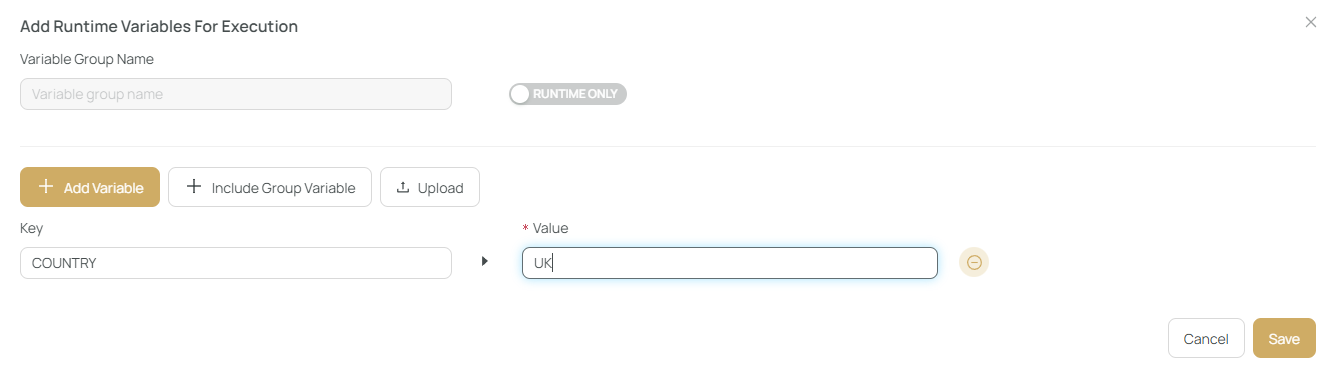
Click on the “+ Add Runtime Variables” button.

A modal appears where you can:
- Add variables one by one
- Include multiple Variable Groups
- Toggle between anonymous or persistent
⬆️ Bulk Upload
Runtime variables can also be uploaded from a file using the Upload button.
This is handy for:
- Large test environments
- Sharing configurations across teams
✅ Use runtime variables to parameterize your executions, improve reusability, and enable dynamic testing setups!