📜 Data Contracts
What is a Data Contract (DC)?
A data contract defines the agreement between a data producer and consumers. You can find more details about how to write a Data Contract (DC) on the official open-data-contract-standard website.
In X-Automate from the Data Contract specification we can extract and execute DQ/DB tests. Each Data Contract will be imported in the app as a Test Suite with test type DC. Each quality specification will be a test case of that test suite.
How to import and sync DCs?
To add Data Contracts in the application you will need to connect a git repository and click Import Data Contracts from repository all files with extension *contract.yaml from repository which respects the OCDS schema will be imported.
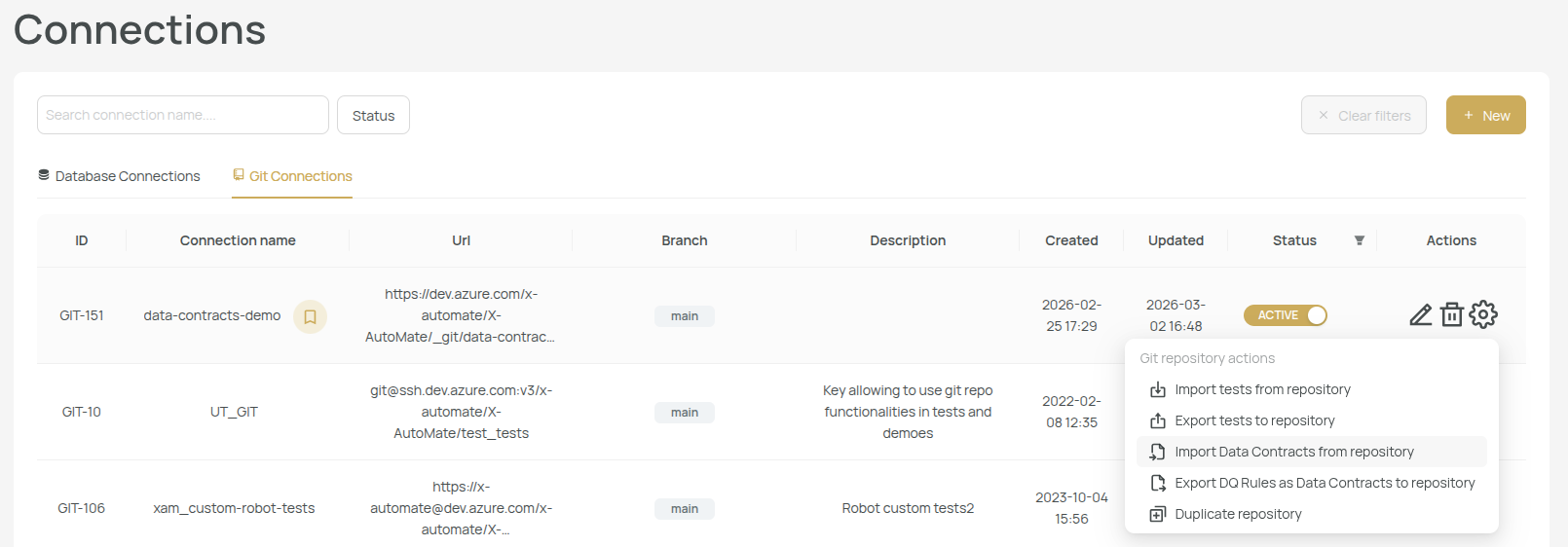
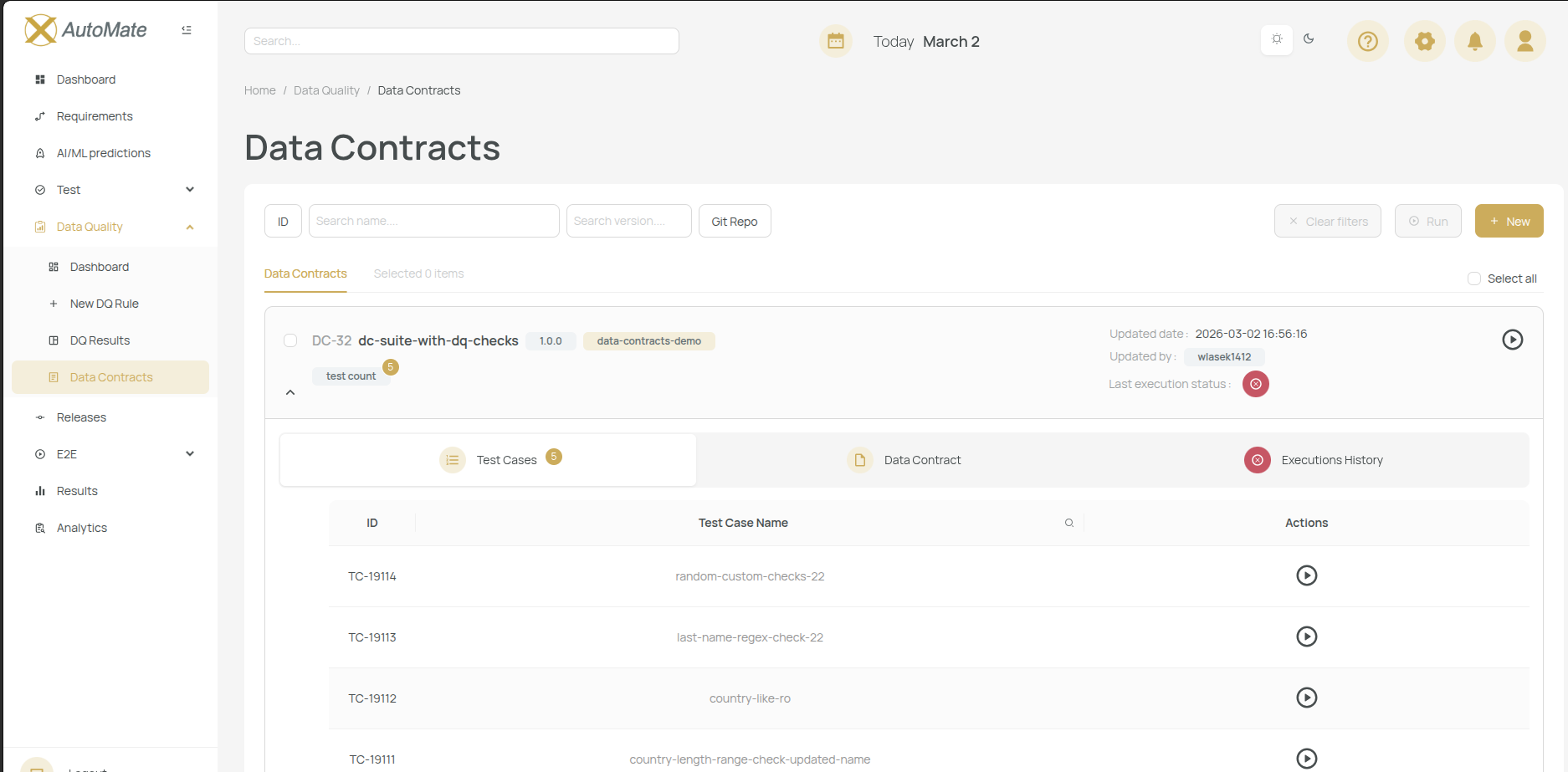
After import, you will see the imported files in Data Quality > Data Contracts page. On DC expand there will be available 3 tabs: Test Cases (the Quality Checks extracted), Data Contract (the yaml file view), Execution History. You can execute the DC and get a robot report. Data Contracts can be updated only from git repository, in the app they can be only executed. There is a configurable cron job which syncs DC from git repo or you can go to Git Connection page and run Import Data Contracts from repository to sync updates.
How to write quality checks using ODCS metrics?
You can find the official documentation for default data quality metrics here.
Here are the metrics available:
- nullValues - Counts null values in a column/field (available only at schema > property level)
- missingValues - Counts values considered as missing: empty strings, N/A, etc. If
argumentsare not provided we'll considermissingValues: [null](available only at schema > property level) - invalidValues - Counts values that don't match valid criteria. You need to provide
argumentswith eithervalidValues: ['list', 'of', 'valid', 'values']orpattern: ^regex-which-includes-only-valid-values$(available only at schema > property level) - duplicateValues - Counts duplicate values in a column. You need to provide
argumentswithproperties: ['list of', 'column names', 'you want', 'to check duplicates']if this metric is set at schema level. If this metric is set at schema > property levelargumentsare not needed - rowCount - Counts total number of rows in a table/object store. Metric available only at schema level.
By default metric unit is set to rows, but you can set it to percent if you want (except for metric rowCount).
For each metric you must set only one must* assertion operator which takes as value a number (int or float).
Here are the assertion operators:
- mustBe: equal to (
==) - mustNotBe: not equal to (
!=) - mustBeGreaterThan: greater than (
>) - mustBeGreaterOrEqualTo: greater than or equal to (
>=) - mustBeLessThan: less than (
<) - mustBeLessOrEqualTo: less than or equal to (
<=) - mustBeBetween: between x and y (
∈) - mustNotBeBetween: not between x and y (
∉)
Here is a Data Contract with some ODCS metrics set:
# yaml-language-server: $schema=https://xampublicdocs.blob.core.windows.net/data-contract-schema/data_contract_schema.json

version: 1.0.0
kind: DataContract
apiVersion: v3.1.0
id: dc-suite-with-dq-checks-and-default-odcs-metrics
name: dc-suite-with-dq-checks-and-default-odcs-metrics   # This will be test suite name
status: active                                           # The status of the test suite (if inactive it can't be executed)

# Only 1 server and schema configuration is supported per data contract
servers:
  - id: DB-1
    server: xam-mysql.mysql.database.azure.com   # This must correspond to the host name specified on Database Connection page
    schema: CORE                                 # This schema will be used for Quality Check generated tests
    type: mysql
    description: Internal DB For XAM
    database: core
    host: xam-mysql.mysql.database.azure.com
    port: 3306

schema:
  - name: employees
    type: table
    physicalType: table
    physicalName: employee   # The table name we are testing

    # Schema-Level Quality Checks
    quality:
      - name: total-row-count-range                     # This will be the Test Name (make sure it's unique)
        description: "Total row count within a range."  # This will be the Test Description
        metric: rowCount                                # One of the default ODCS Metric names
        mustBeBetween: [50, 250]                        # One must* operator which will be checked against generated SQL for selected metric

      - name: composite-key-uniqueness                  # Unique Test Name
        description: "The combination of First_Name and Last_Name must be globally unique." # Test Description
        metric: duplicateValues                         # Schema level metric
        mustBe: 0                                       # That one assertion operator
        arguments:                                      # At schema level duplicateValues metric needs a subset of column names to check for duplicates (if not provided all columns will be taken into consideration)
          properties:                                   # We can have this bullet notation or you can just use a list like with mustBeBetween
            - First_Name
            - Last_Name

      - name: sql-exact-distinct-id-check               # Test Name
        description: "SQL custom validator ensuring exact volume matching of structural primary keys." # Test Description
        type: sql                                       # Optional
        # The custom SQL query must return a numeric value of expected count so it can be checked agains must* operator
        query: |
          SELECT COUNT(DISTINCT Employee_ID) FROM CORE.employee
        mustBe: 200

    # Column/Field-Level Properties & Quality Checks
    properties:
      - name: Employee_ID
        type: integer
        physicalType: int
        physicalName: Employee_ID                       # We need the column name on which we set the quality checks
        quality:
          - name: empid-no-duplicates
            description: "Employee_ID must never have duplicates."
            metric: duplicateValues
            mustBe: 0
            unit: rows                                 # (Optional) by default unit is rows

          - name: empid-no-duplicates-percent-lt-10
            description: "Employee_ID must have less than 10% duplicates."
            metric: duplicateValues
            mustBe: 10
            unit: percent                              # (Optional) you can set it to percent

          - name: empid-null-threshold
            description: "Null values in Employee_ID must be strictly less than or equal to 0."
            metric: nullValues
            mustBeLessOrEqualTo: 0
            unit: rows

      - name: First_Name
        type: string
        physicalType: varchar
        physicalName: First_Name                      # Here is another column we check
        quality:
          - name: firstname-lowercase-minimum-presence
            description: "We must have a healthy baseline of at least 100 lowercase employee records."
            metric: invalidValues
            # regex pattern of valid values. values that don't match this pattern will be considered invalid
            arguments:
              pattern: '^[a-z]'
            mustBeGreaterThan: 99  # passes if 100 or more rows match the valid pattern
            unit: rows

      - name: Last_Name
        type: string
        physicalType: varchar
        physicalName: Last_Name

      - name: Country
        type: string
        physicalType: varchar
        physicalName: Country # Column Name
        quality:
          - name: country-missing-values-percent # test name
            description: "Country missing values must account for at least 90% of the dataset." # test description
            metric: missingValues  # metric name
            arguments:
              missingValues: [null, '', ' ']
            mustBeGreaterOrEqualTo: 90
            unit: percent
All ODCS Metrics with their operators, unit and arguments will be converted into a DQ Custom test by xam.
How to write quality checks using xam custom implementation?
You also have the option to use the 1-to-1 DQ simple checks inside data contracts by filling the implementation field.
Here is a trimmed down example of a Data Contract (DC). Checkout the comments on the fields. Field quality is specific to X-Automate the rest of the fields can be taken from open-data-contract-standard.
# yaml-language-server: $schema=https://xampublicdocs.blob.core.windows.net/data-contract-schema/data_contract_schema.json

version: 1.0.0
kind: DataContract
apiVersion: v3.1.0
id: dc-suite-with-dq-checks
name: dc-suite-with-dq-checks   # This needs to be unique is equivalent to Test Suite name
status: active                  # DC is active or inactive
servers:
- id: DB-1
  host: xam-mysql.mysql.database.azure.com       # This must correspond to the host name specified on Database Connection page
  schema: CORE                                   # This schema will be used for Quality Tests
  type: MYSQL
  description: Internal DB For XAM
  database: core
  port: 3306
  server: xam-mysql.mysql.database.azure.com

schema:
- quality:                            # This is a quality check specification, you can add as many as needed
  - name: random-custom-checks-22     # This will be the Test Case Name which needs to be unique
    type: custom                      # Optional will be custom by default
    engine: xam                       # Optional will be xam by default
    implementation:                   # This is a CUSTOM implementation because we have those raw sql queries: count_query, bad_count_query, verification_query
      threshold: percentage           # Threshold can be percentage or amount
      threshold_critical: 98.5        # Value critical for threshold
      threshold_warning: 99.7         # Value warning for threshold
      count_query: select count(*) from core.employee;               # 1. All Records Query
      bad_count_query: select count(*) from core.employee;           # 2. Bad Records Query
      verification_query: select count(*) from core.employee;        # 3. Validate Query
- physicalType: table
  physicalName: employee                  # This is the Table Name mandatory for quality of type xam_simple
  properties:
  - physicalType: int                     # This is the Column Data Type mandatory for quality of type xam_simple
    physicalName: Employee_ID             # This is the Column Name mandatory for quality of type xam_simple
    required: true                        # This will create a dq test named: "dq-required-{schema}-{table}-{column}" with MetricName.TEXT_MISSING_VALUES or MetricName.NUMBER_NULL_COUNT based on column data type and both thresholds at 100%
    unique: true                          # This will create a dq test named: "dq-unique-{schema}-{table}-{column}" with MetricName.UNIQUENESS and both thresholds at 100%
    quality:
    - name: employee-id-is-unique-22             # Qulity name which will be Test Case name (must be unique)
      description: Has some random filters       # Test Case Description
      implementation:                            # This is a SIMPLE implementation because we have simple metrics (metric: uniqueness) and we don't use the raw queries (count_query, bad_count_query, verification_query)
        threshold: percentage                    # Can be percentage or amount same as with DQ checks
        threshold_critical: 98.5
        threshold_warning: 99.7
        metric: uniqueness                       # Must be choosen carefully based on Column Data Type (some metrics can be applyied only for numeric column data types for example and some can be applied to all column data types)
        filters:                                 # Here we can specify filters that will be applied before the metric is executed
        - column_name: Country                   # Column Name
          column_type: varchar                   # Column Data Type
          filter_name: not_equals                # Filter name - similar to metric must be choosed carefully based on column_type
          values:
          - romania
        - column_name: Employee_ID
          column_type: int
          filter_name: greater_than
          values:
          - 0
Metrics for Simple Implementation
Here are the metric names available for simple implementation (The implementation without: count_query, bad_count_query, verification_query). They are equivalent to Quality Simple Checks in the UI, only prefixed to make it easier to identify proper metric based on Column Data Type.
Metrics available for all Column Data Types:
contains(Allowed Values (in))not_contains(Allowed Values (not in))uniqueness(Uniqueness)
Metrics available for datetime Column Data Types:
datetime_value_range(Value Range (between))
Metrics available for numeric Column Data Types:
number_value_range(Value Range (between))number_null_count(Null Count)number_zeroes_count(Zeroes Count)number_equal(Math all below)number_not_equalnumber_greater_thannumber_greater_than_or_equal_tonumber_less_than_or_equal_tonumber_less_than
Metrics available for text Column Data Types:
text_missing_values(Missing Values (= ''))text_length_range(Length Range (between_str))text_like(LIKE)text_not_like(NOT LIKE)text_match_regex(Regular Expression)text_not_match_regex(Regular Expression)
Here are the available filters you can use:
Filters for Simple Implementation
Same as with metrics, filters must be choosed based on column data type.
Tier 1: Core Logic & Comparison (Daily Use)
equalsnot_equalsandornotis_nullis_not_nullinnot_ingreater_thanless_thangreater_than_or_equal_toless_than_or_equal_tois_trueis_false
Tier 2: Text Search & Common Ranges
ilikelikebetweennot_betweencontainsnot_ilikenot_likeagelength
Tier 3: Math & JSON/Key Operations
additionsubtractionmultiplicationdivisionkey_existsany_key_existsall_keys_existcontained_byis_distinct_from
Tier 4: Full-Text Search & Logic Extensions
to_tsvectorto_tsquerypath_querysimilar_tological_andlogical_orlogical_notxor
Tier 5: Specialized / Geospatial / Bitwise
distanceintersectsabsolute_valuemodulussquare_rootbitwise_andbitwise_orbitwise_notbitwise_xorshift_leftshift_rightabovebelowis_above_or_sameis_below_or_sameis_left_or_sameis_right_or_sameis_same_horizontalis_same_verticalis_parallelis_perpendiculardistance_between_centerscontained_by_or_equalcontains_or_equalsame_asis_distinctis_not_distinct_fromis_not_trueis_not_falseis_unknownis_not_unknownpath_querytextdelete_pathsetweightstripnot_greater_thannot_less_thannot_similar_to